Skip to content

—How it works

How it works

What your students see, what your staff see, and what the assistant will and won't do. The demo uses made-up data; the messages are the assistant's real wording.

Watch a student go from first text to “mailed”

An illustration of the assistant: a student texts through their CSLB application step by step while the school's staff view updates. Chapters: Your school enrolls a student; Work history, with CSLB's 4-year math; The student goes quiet. The assistant doesn't.; Private details stay off text; Every box checked, then confirmed; Signed, mailed, done.

Illustration with made-up data. Messages use the assistant's real wording.

Step by step

  1. 1. Your school enrolls the student

    You send us the names and mobile numbers of students who agreed to texts on your school's form. Their first text comes from your school's application assistant and says plainly that it's automated and not CSLB. Students can reply HELP, PAUSE, STATUS or SCHOOL at any time.
  2. 2. Work history and the 4-year check

    CSLB asks for 4 years of journey-level experience in the last 10 years, proven by a certification form for each place of work. The assistant collects each place, keeps a running estimate, and flags short histories to your staff. It always says CSLB makes the final call.

    • Suggests the classification from plain words (“electrical” → C-10) and asks the student to confirm
    • Offers to text each certifier a link to the work-experience form with the student's part filled in
    • Owner-builder experience is handled: blank pages are added for the student to fill in by hand
    Source: CSLB Public Information FAQ
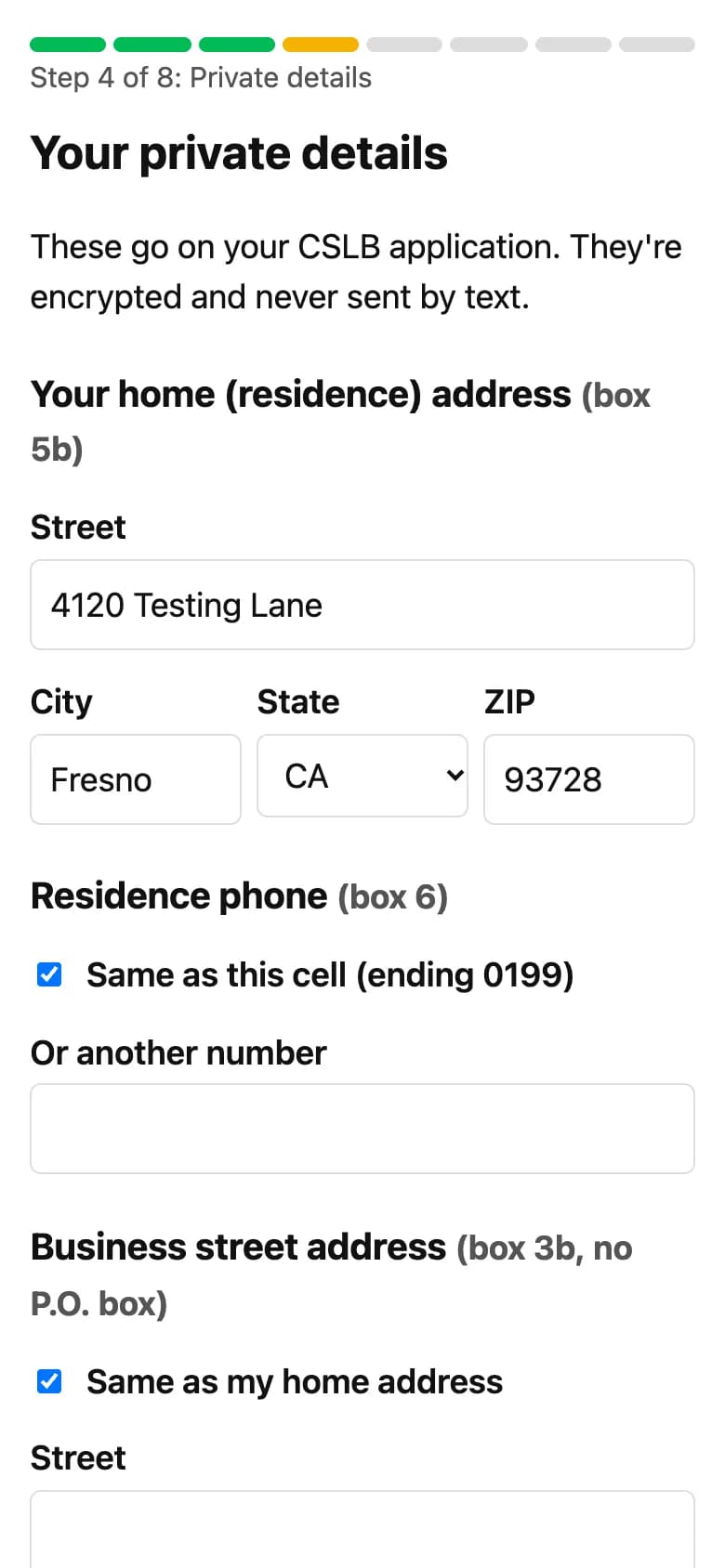
  3. 3. Private details on private pages

    Addresses and CSLB's yes/no disclosure questions are entered on a private page that opens with a one-time code texted to the student's phone. For the SSN and birthdate, students choose: a separate encrypted page, or leave those boxes blank and handwrite them.

    Phone screenshot of the private details page with a progress stepper at step 4 of 8
    The private details page (made-up data).
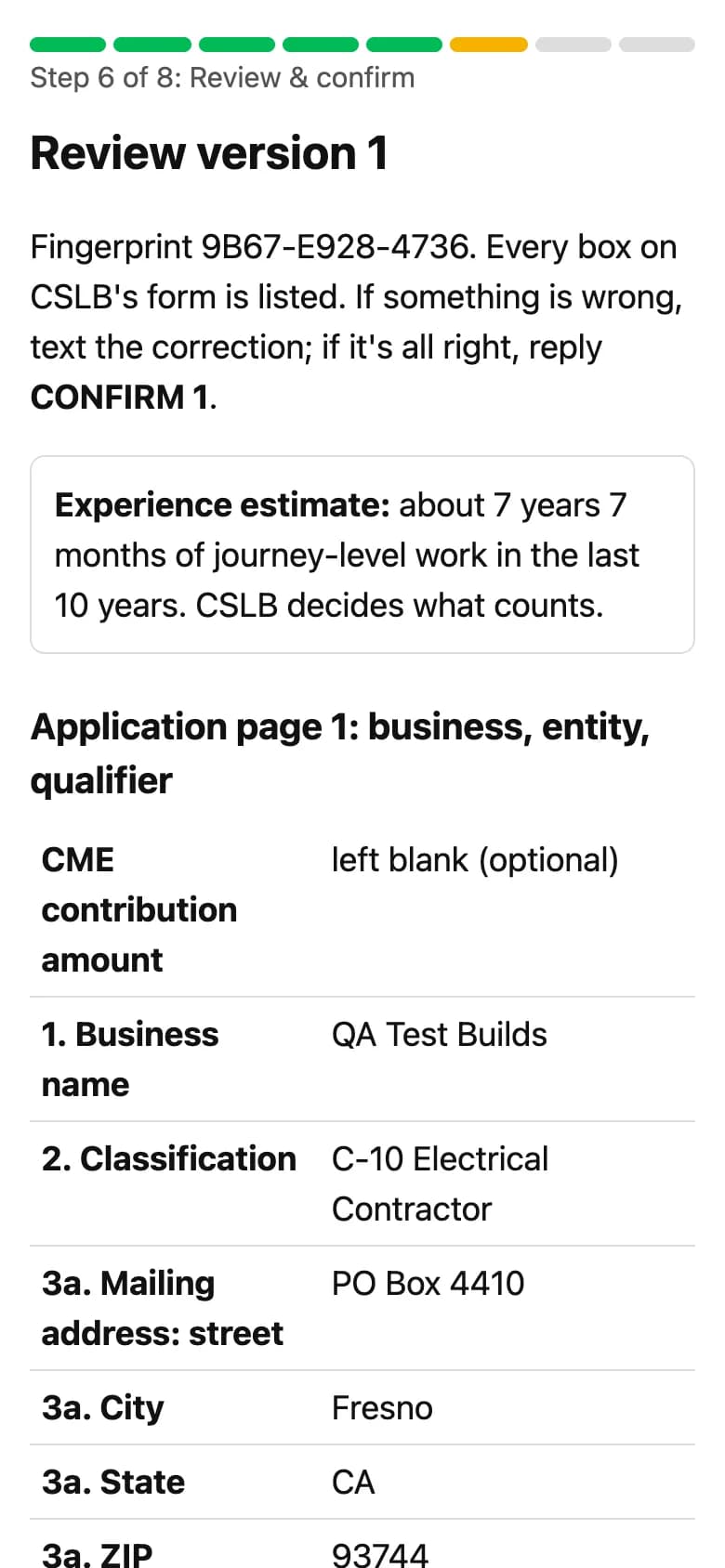
  4. 4. Every box checked, one version confirmed

    Before anything is printed, the student reviews a page that lists every box of CSLB's form, filled in or marked N/A. They confirm a numbered version by texting CONFIRM. If anything changes later, they get a new version and are told not to mail the old one.

    Phone screenshot of the review page listing the boxes of CSLB's form
    The review page (made-up data).
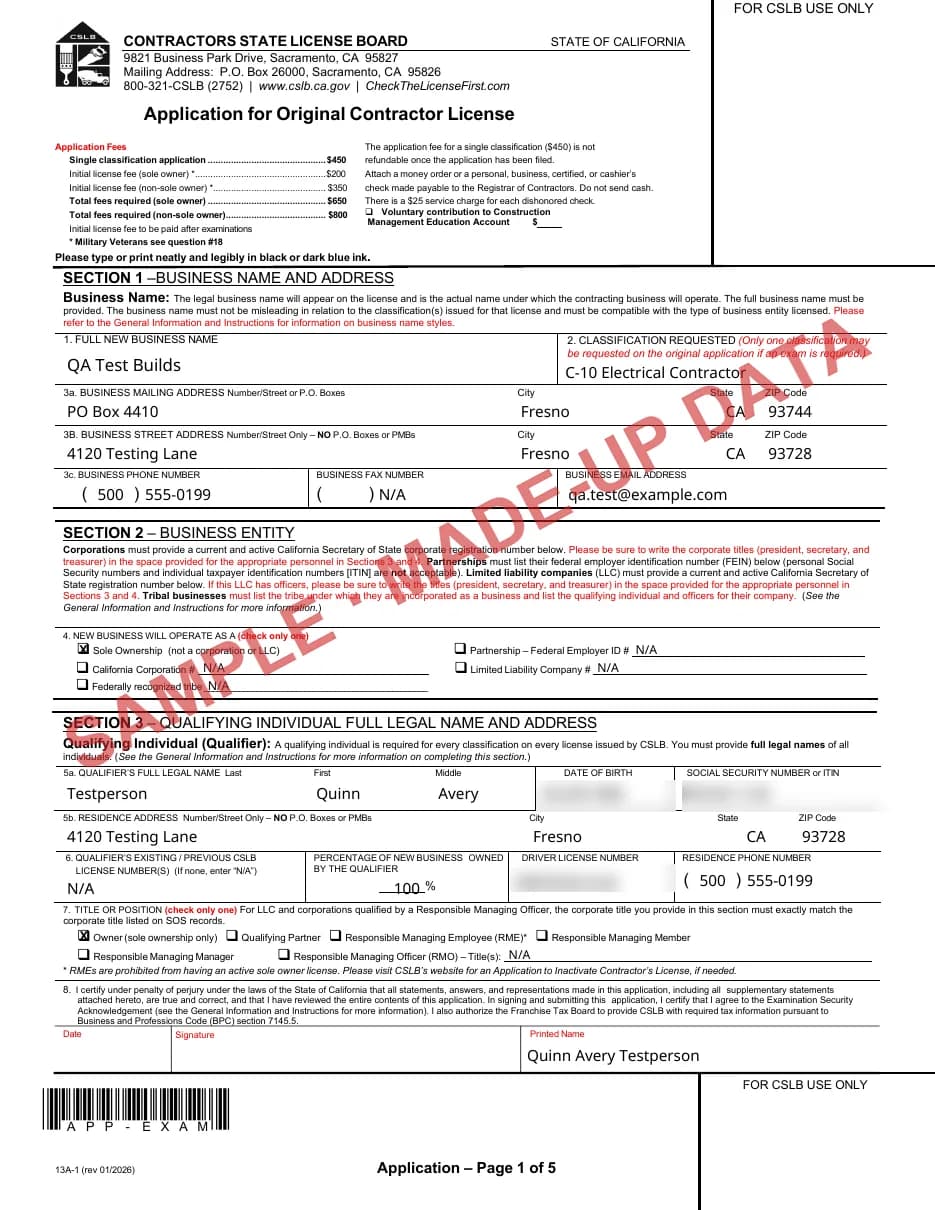
  5. 5. CSLB's official form, ready to sign

    The student downloads CSLB's own application (form 13A-1) filled in, with one work-experience form per employer. They print it, sign in ink and mail it with their check. A short checklist walks them through it, and they text MAILED when it's sent. Their SSN and birthdate are then deleted.

    Page 1 of CSLB's application form filled in with made-up data, sensitive boxes blurred
    Page 1 of the filled-in CSLB form (made-up data, sensitive boxes blurred).
  6. 6. Reminders, and your staff only when needed

    If a student goes quiet, reminders showing their progress go out over the following weeks (up to four), only between 9am and 8pm and never on Sundays. Your staff see every student's step and get flags for the cases that need a person.

    • Experience estimate under 4 years
    • A disclosure answer that needs a written statement
    • Company, add-class or waiver applications
    • A question the assistant can't answer reliably, or a student who asks for a person

How student data is handled

By text
No Social Security numbers, birthdates or private answers. If a student texts an SSN, it isn't kept.
Private pages
Open only with a one-time code sent to the student's phone.
SSN and birthdate
Kept in a separate encrypted vault, deleted after mailing, 14 days after download, or 30 days, whichever comes first.
Everything else
Stored encrypted. Text message bodies are dropped after 30 days. Application data is deleted 90 days after it ends, or when the student texts DELETE.
Your staff
See progress and flags, never private details.

006Careful by design

Built to stay accurate

What it never does

  • Tell a student they qualify. CSLB decides, and it says so.
  • Accept a Social Security number by text.
  • Sign, pay or file anything for a student.
  • Quote a fee or deadline that isn't in CSLB's published material.
  • Pretend to be a person or CSLB.

What it covers today

  • Sole owners applying for their first California license
  • One classification per application
  • Filing by mail with CSLB's official paper form

Handed to your staff

  • LLC, corporation and partnership applications
  • Adding a classification, exam waivers
  • Students who need help in Spanish

Book a 20-minute demo

See the assistant with a real application,
and how it would fit your school.